

Monthly KPI scoring
Sales agent performance KPIs from activity, pipeline, and revenue, rolled into a configurable points total and a performance rating.
This real estate agent KPI dashboard scores each sales agent every month from the data they already create — activity, pipeline, and revenue — and rolls it into a configurable points total and rating. Managers get a team leaderboard, agents get transparent scorecards, and daily and monthly reports deliver an operational scoreboard by email and PDF.
A quick map before the detailed product proof. Jump to the area that matters most.
Turn monthly activity achievement into a transparent payout
Score the work that actually moves deals
Four tabs, from team ranking to the metric behind every number
Open the exact records behind any KPI
Tune the plan without re-scoring the past
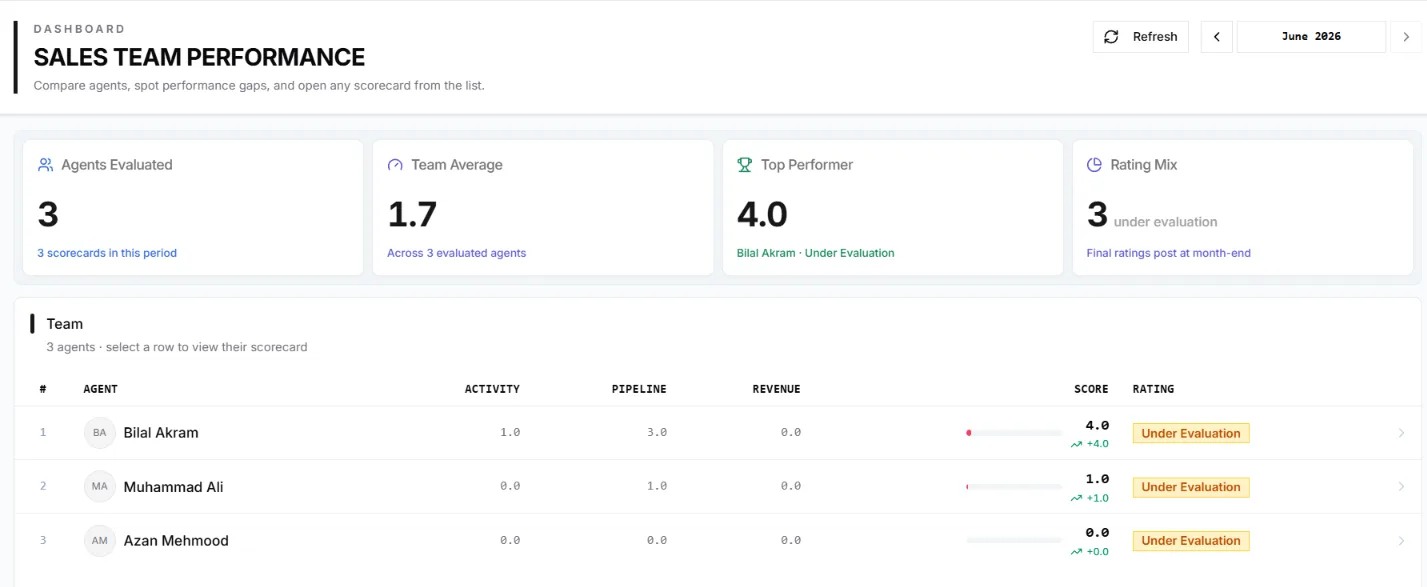
The agent performance dashboard ranks agents by score with a rating mix and quick summary tiles — agents evaluated, team average, top performer. Select any row to open that agent's full scorecard.
An optional incentive policy scores selected activity metrics independently from the core KPI weights. Admins configure targets, points, and achievement-based payout tiers. Agents see an estimated amount during the month and the earned amount after finalisation, while managers can compare incentives on the team leaderboard.
Every agent's monthly score is built from three categories of real CRM activity. Activity rewards outreach — calls, WhatsApp, meetings, and property viewings. Pipeline rewards progression — opportunities created and offers sent. Revenue rewards results — closed sale value from active sale MOUs. Every metric, revenue included, earns its marks multiplied by achievement against target, capped at full marks. The current month is labelled Provisional until it closes.
Demo figures
The Performance & PPA dashboard has Summary, Overall KPIs, PPA and Activity Details tabs under a pinned header with month and agent filters. Summary ranks the team and opens any agent's scorecard. Overall KPIs lists every KPI with actual, target, achievement and points. PPA is the activity-incentive scorecard: achievement maps to the payout tier reached, with no interpolation. Activity Details sets what each channel logged beside what the scorecards counted.
Company-wide view without Performance — View Payout: payout amounts show as Hidden, achievement percentages stay visible.
Select a KPI on the Overall or PPA scorecard and IRM365 opens the Activities, Opportunities, Sales Offers or MOUs list, already narrowed to that KPI, agent and month. The row count matches the dashboard. Switch to all records in the period to see what did not count, such as no-answers, no-shows or drafts.
Admins tune metric targets, point weights, and rating bands, with per-agent target overrides and a preview against unsaved changes. Designations decide who is evaluated through an active KPI profile. Edits are effective-dated and closed months are frozen as snapshots, so scores stay fair and auditable.
A transparent, configurable scoring layer built from the CRM and sales data your team already produces — not a black-box rating.
Sales agent performance KPIs from activity, pipeline, and revenue, rolled into a configurable points total and a performance rating.
Rank agents by KPI score in the dashboard and review scheduled, completed, overdue, completion rate, and leads assigned in daily and monthly reports.
Score, rating, category split and PPA progress, then every KPI with actual, target, achievement and points, plus a score trend and conversion funnel.
Tune metric targets, point weights, rating bands, and per-agent target overrides, and preview the effect before saving.
Agents see themselves, managers see nested reports, and users with Performance — View All, such as a leads admin, can review the full company, without payout amounts unless they also hold the payout permission.
Closed months freeze as snapshots and effective-dated edits apply next month, so historical scores never change.
Only employees whose designation carries an active KPI profile are evaluated and added to monthly snapshots.
Configure activity targets, points, and payout tiers separately from KPI weights, with estimated and finalised monthly incentive amounts.
IRM365 modules are connected. Explore the next capabilities that usually sit beside this feature in a real brokerage workflow.
Join UAE real estate teams who run their entire business — leads, deals, contracts, and finance — from one platform. No annual contract.