

Normalized phone matching
Country-code and spacing differences do not create separate agent workloads for the same person.
Duplicate lead management that detects repeat leads by normalized phone and email, hides the new duplicate from active agent queues, and gives managers controlled resolution paths: merge, convert, or merge and reassign.
A quick map before the detailed product proof. Jump to the area that matters most.
When a lead is created manually, imported, or delivered through a campaign integration, IRM365 checks normalized mobile numbers and email addresses against existing active leads. If either matches, the new record is flagged as a duplicate and linked to the original.
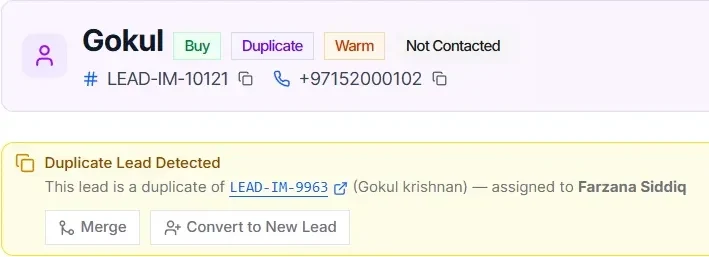
Duplicate leads are not deleted and they should not pollute an agent’s active list. The creator sees a warning, the duplicate is removed from their working queue, and a team manager or user with duplicate-management permission reviews both histories side by side.
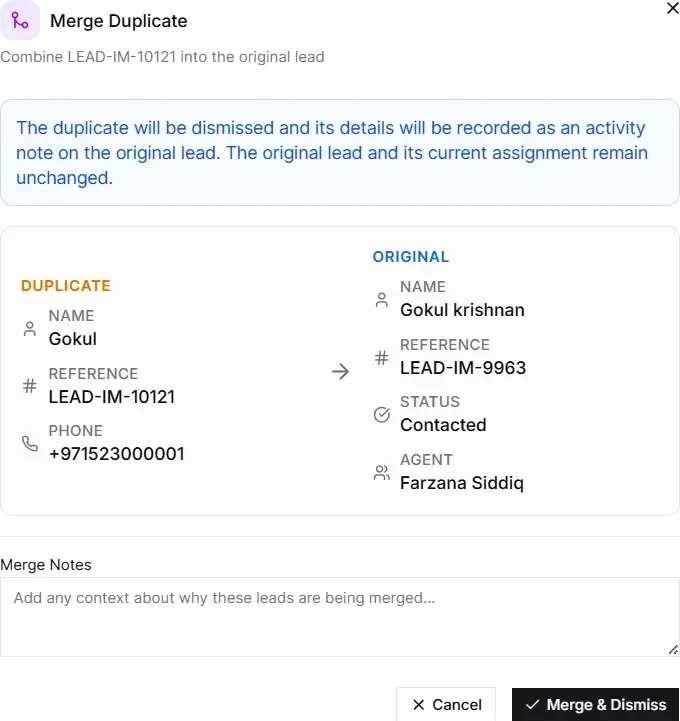
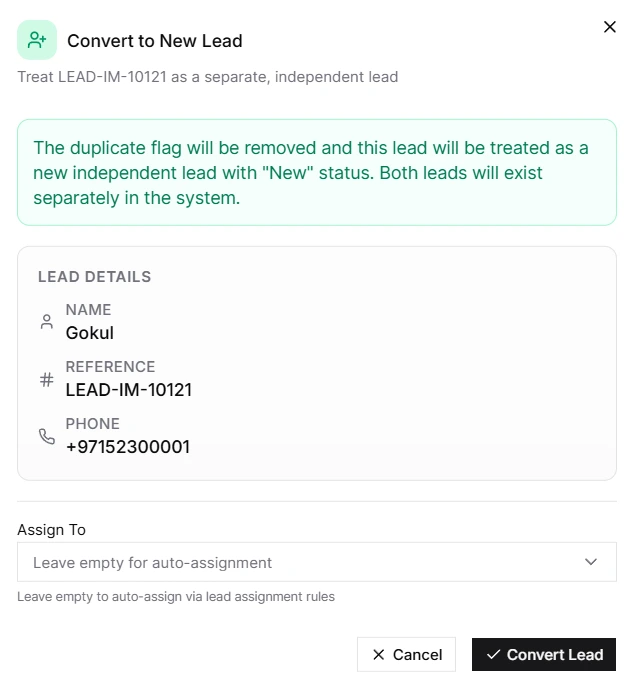
Managers choose the resolution that fits the situation: merge repeated interest into the original, convert the duplicate into a fresh standalone lead, or merge the duplicate while transferring the original to the agent who should now own the follow-up.
Merge duplicate leads without deleting data: every match is reviewable, every resolution is intentional, and the original lead history stays intact.
Country-code and spacing differences do not create separate agent workloads for the same person.
Repeated enquiries with the same email are flagged before they reach active lead queues.
The duplicate record is forwarded to review and does not stay in the creator’s working list.
Activities, attachments, and notes can be consolidated into the original lead while preserving history.
If the match is a real new opportunity, managers can activate the duplicate as a standalone lead and route it.
Merge, convert, and merge-and-reassign actions are recorded so ownership decisions stay explainable.
A new enquiry from a previously disqualified contact can remain a new lead linked back to the earlier record, rather than being treated as a duplicate.
IRM365 modules are connected. Explore the next capabilities that usually sit beside this feature in a real brokerage workflow.
Capture, qualify, and inspect every lead once duplicate noise is controlled.
Learn moreRoute converted duplicate leads through assignment rules or manager handoff.
Learn morePreserve calls, notes, attachments, and follow-up history during consolidation.
Learn moreJoin UAE real estate teams who run their entire business — leads, deals, contracts, and finance — from one platform. No annual contract.